---
title: Railway vs Northflank: Technical Comparison and Migration Guide
description: Compare Railway and Northflank on infrastructure, scaling, pricing, deployment experience, and AI capabilities, with a step-by-step migration guide.
---
_Last updated: July 2026_
At a high level, both Railway and Northflank can be used to package, deploy, host, and monitor software on the web. Both support multiple service types, including web applications, APIs, storage buckets, databases, and more, and both are easier to work with than most cloud service providers. That said, there are notable differences worth considering when choosing where to host your software, including the infrastructure model, pricing mechanics, and AI capabilities.
- Deployments from a Docker image or by importing source code from GitHub.
- Multi-service architecture: web applications, APIs, workers, and databases under one project.
- Services deployed to long-running servers.
- Persistent storage via volumes.
- Public and private networking out of the box.
- Healthchecks and zero-downtime deployments.
- Isolated preview environments for every pull request.
- Instant rollbacks.
- Integrated metrics and logs.
- Infrastructure-as-Code.
- CLI management of resources.
- Cron jobs.
- Custom domains with fully managed TLS.
- Remote SSH into deployed services.
- Usage-based billing.
- Sandboxes.
This guide covers both platforms in detail to help you understand when to choose each.
## Infrastructure model
### Northflank
Northflank makes running applications on Kubernetes (k8s) easier. Kubernetes is an extremely powerful container orchestration framework, but it comes with a steep learning curve. Northflank abstracts away many of the gnarliest parts of k8s operation, but core Kubernetes concepts are still intentionally part of the product surface: services map to cluster resources, and compute plans map to Kubernetes resource requests. This is a good fit if you have a team that's confident with container orchestration and looking for a platform to help operate or scale their clusters.
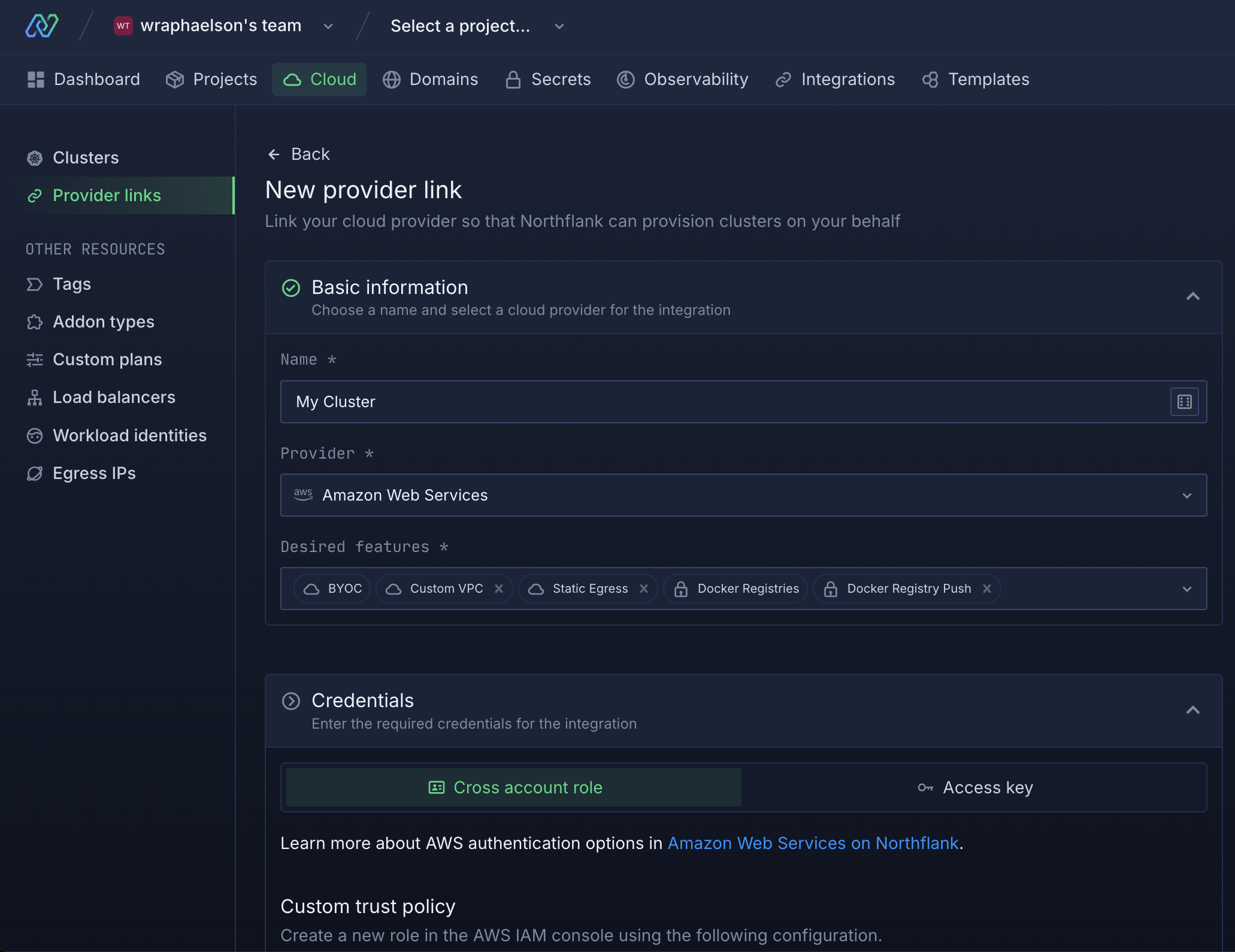
Northflank also lets you bring your own cloud and use Northflank as the control plane, leveraging it to package and deploy applications into your own cloud account. This can be valuable in two cases:
1. Users with strict data residency requirements.
2. Users who want to administer their own cluster directly.
The trade-off is that you'll have two bills to pay: one for Northflank and one for your cloud provider.
### Railway
Railway abstracts away underlying infrastructure like Kubernetes, managing its own custom orchestration of servers on your behalf. You don't need to know about servers, containers, clusters, or networking. This is ideal for teams that are broadly uninterested in underlying infrastructure mechanics and want to focus on shipping code.
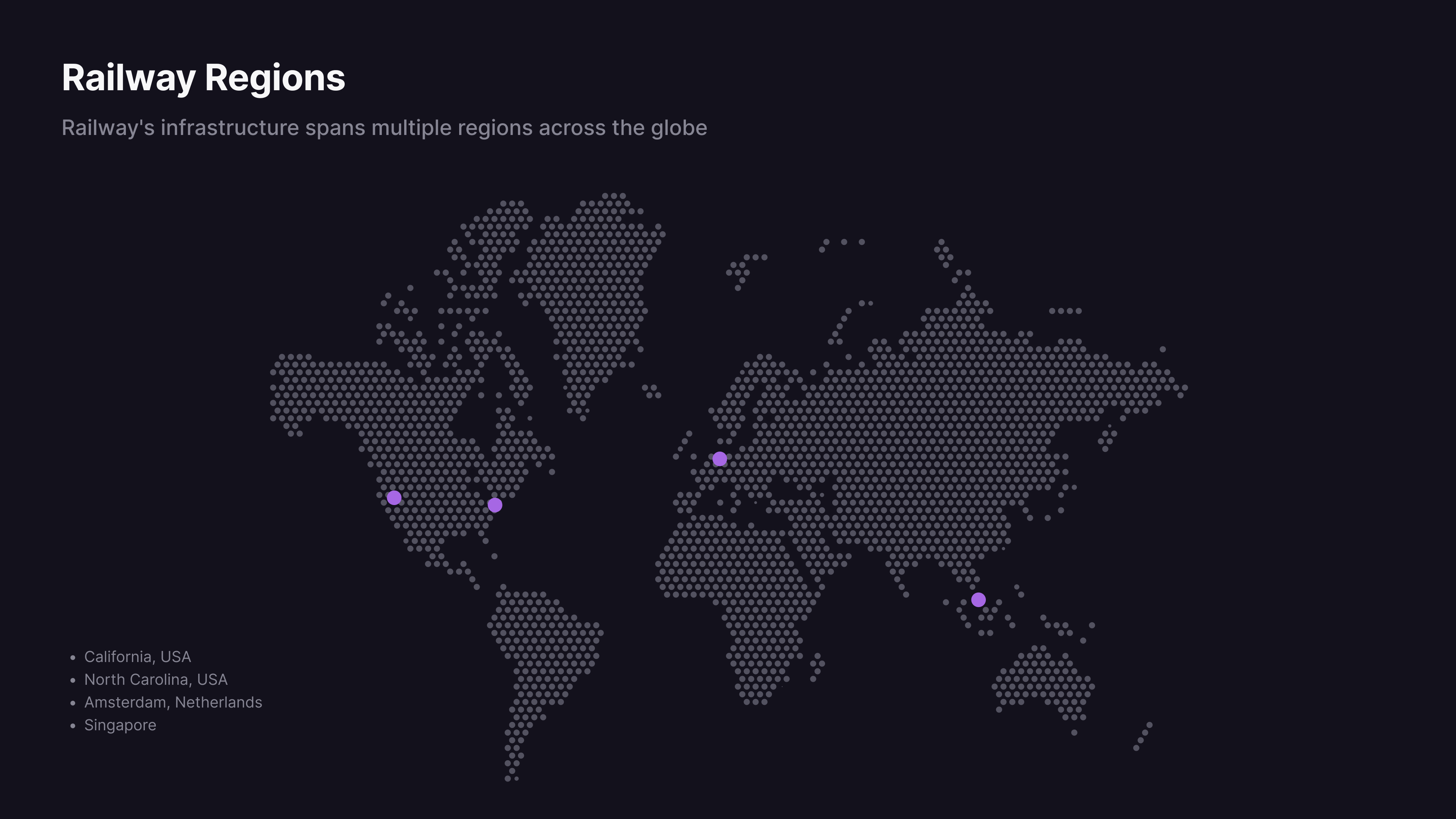
Railway operates its own infrastructure in data centers globally through [Railway Metal](/platform/railway-metal). Because of this, it can provide a significantly less expensive product, avoiding the margin typically associated with hyperscalers like GCP, AWS, and Azure. And because Railway provides and manages the infrastructure, there's only one vendor for procurement to vet and one bill to pay.
## Scaling strategies
### Northflank
Northflank follows a traditional, resource-based model. Each resource has a set of allocated compute resources for memory and CPU.
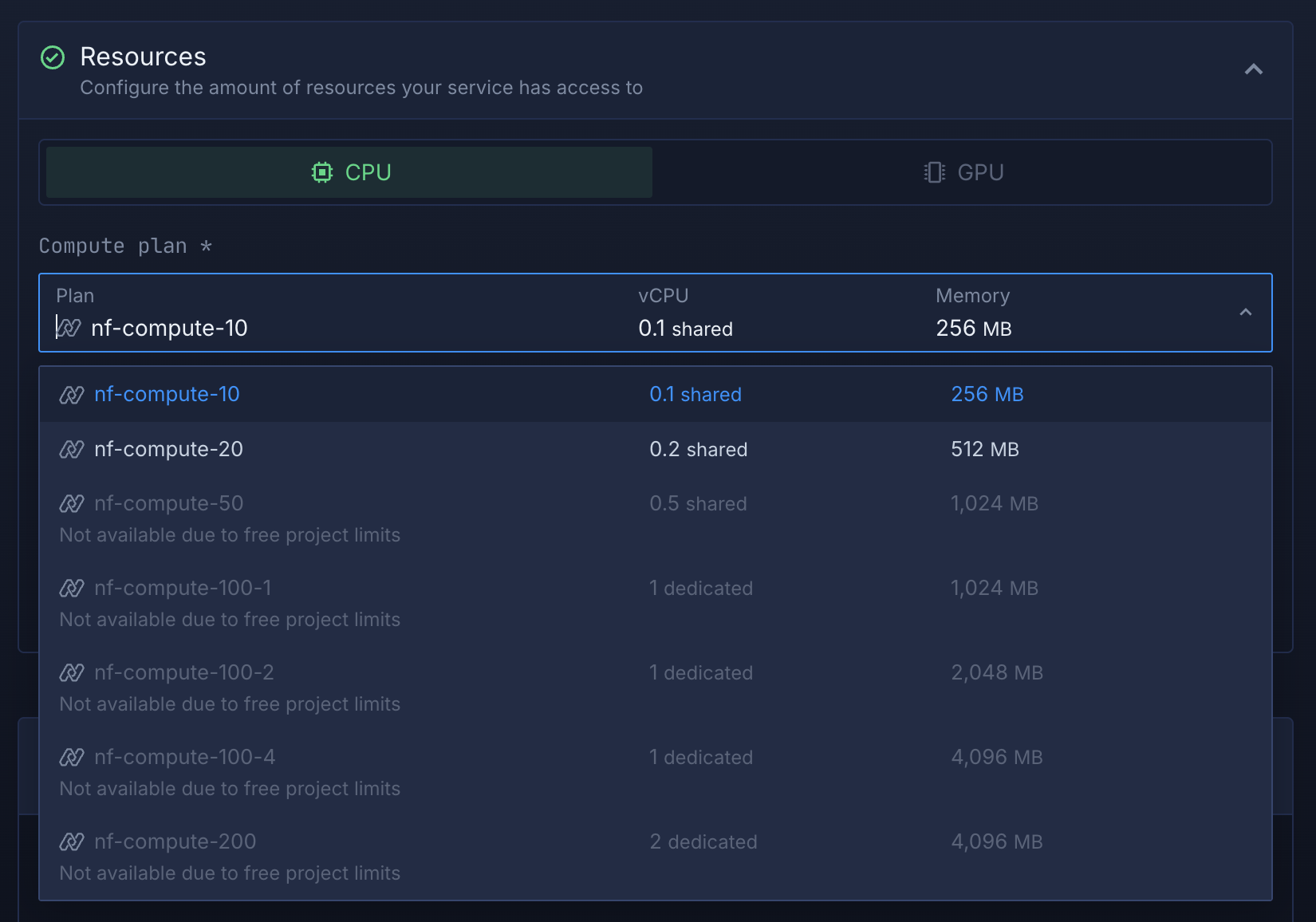
When your deployed service needs more resources, you can either scale vertically by manually upgrading to a larger instance size, or horizontally by specifying a machine count or configuring autoscaling rules.
### Railway
Railway automatically manages compute resources for you. Your deployed services can scale up or down based on incoming workload without manual configuration of thresholds or picking instance sizes. Each plan includes defined CPU and memory limits that apply to your services.
You can also scale horizontally by deploying multiple replicas of your service. Railway automatically distributes public traffic randomly across replicas within each region. Each replica runs with the full resource limits of your plan.
Replicas can be placed in different geographical locations for multi-region deployments. The platform automatically routes public traffic to the nearest region, then randomly distributes requests among the available replicas within that region.
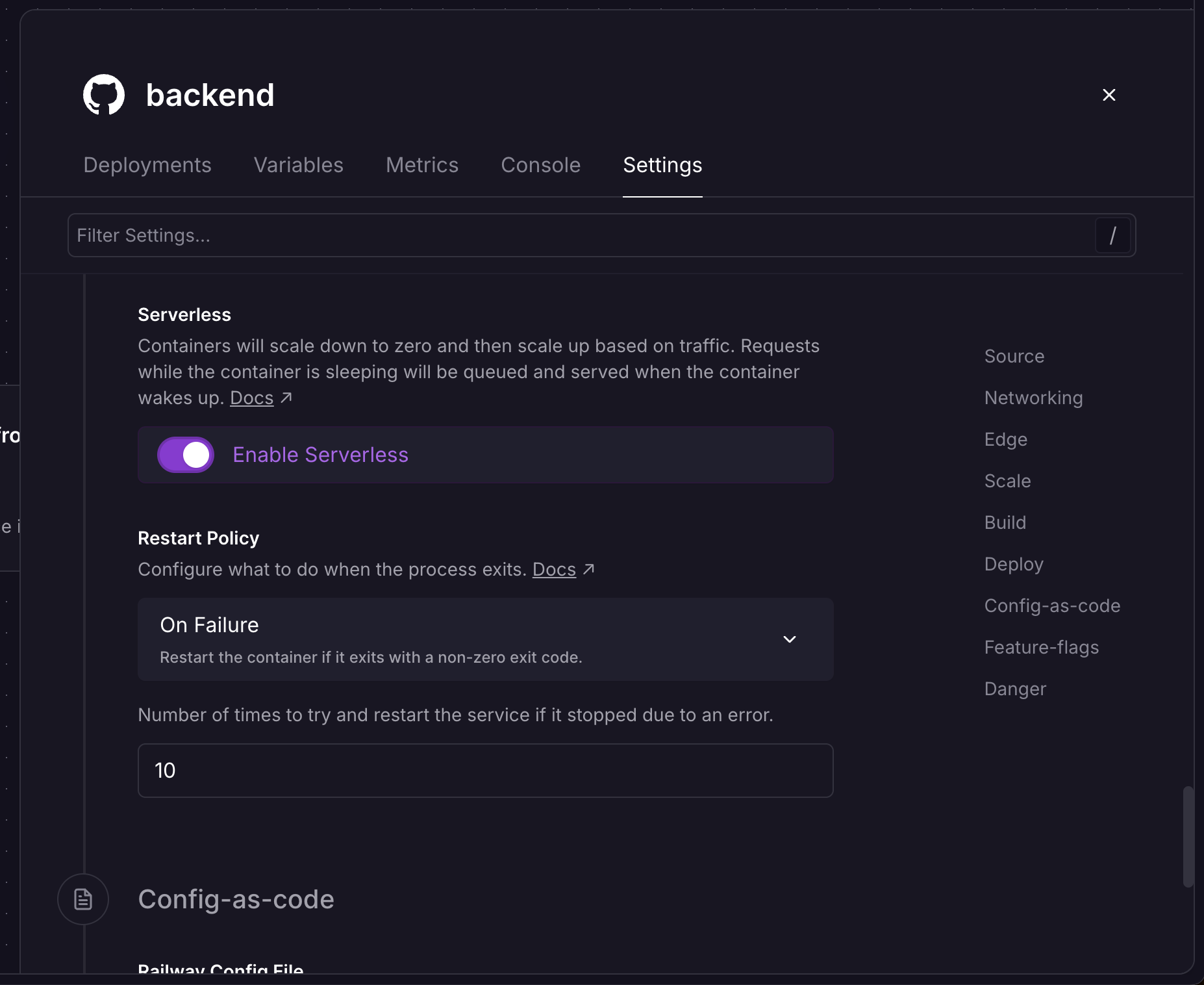
Scaling down is just as important as scaling up, and Railway automatically releases memory allocations as demand falls. By default, Railway always allocates a minimum amount of memory for your service, even when it's not in use. To scale even lower than that minimum, you can scale to zero by toggling [serverless](/deployments/serverless) in your service settings. After ten minutes, a serverless container that hasn't done any work is fully put to sleep, then wakes up on the next request.
For services with known usage patterns, such as data workloads that run once a day, you can scale them efficiently by putting them on a cron schedule. This lets you run scripts at specific times and only pay for the time they're running.
## Pricing
### Northflank
Northflank bills per second of resource allocation. When you pick a plan for a service, you're billed at that plan's rate for the number of seconds the service exists. A running service bills its full plan size regardless of how much of its resources it uses. The rates themselves are straightforward, $0.01667 per vCPU-hour and $0.00833 per GB of memory per hour, and plans bundle those into fixed tiers like nf-compute-100-2 (1 vCPU, 2 GB) at $24 per month. Since billing is tied to the plan rather than the workload, the plan has to be sized for your service's peak, and every hour it spends below that peak is capacity you're paying for but not using.
A payment method is required before creating any resources, on every plan, including the free tier. As noted above, bringing your own cluster adds Northflank platform fees on top of your cloud provider bill.
### Railway
Railway bills per minute of resource consumption. When you pick a plan, you're picking a resource ceiling that a service cannot exceed. If a service uses less than its ceiling, you're only charged for what it uses, including nothing at all for idle serverless services. Rates are $20 per vCPU-month and $10 per GB of memory per month, metered continuously, so a service that idles at 200 MB most of the day and briefly spikes to 2 GB bills mostly at 200 MB. There are no per-service instance sizes to select and no plan tiers to outgrow; services scale within the ceiling on their own.
This difference surfaces in workloads that aren't busy around the clock, which is most of them. On Northflank, you pay for the gap between peak sizing and actual usage. On Railway, that gap is closed automatically so you don't pay for it.
### Pricing worked example
To illustrate the difference between Northflank's static pricing and Railway's more dynamic model, consider a background worker processing image uploads at unpredictable times around the clock.
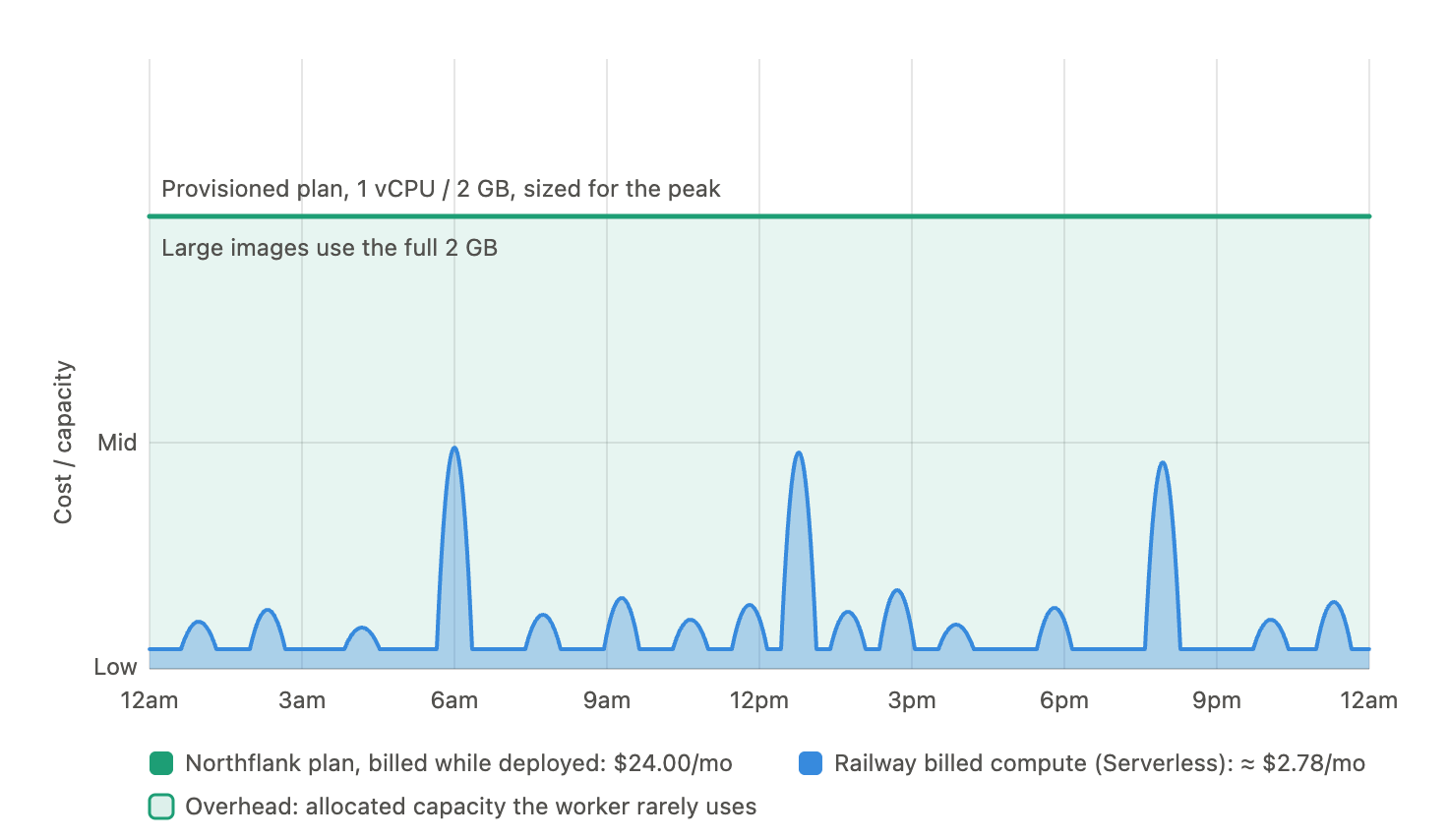
The example workload processes:
- ~50 uploads/day, at
- ~2 min processing each
- ≈ 100 active minutes/day,
- **~50 active hours/month**
Memory peaks around 2 GB while a large image is being processed, and idles at a couple hundred MB the rest of the time. Sized at 1 vCPU / 2 GB.
With Serverless enabled, Railway bills close to the ~50 hours it's actually processing something:
- Combined rate for 1 vCPU + 2 GB is $40/month (720 hrs) ≈ $0.0556/hour
- 50 hours × $0.0556 ≈ **$2.78/month**
That's the highest possible estimate, as Railway meters actual usage, so the minutes spent below 2 GB bill below 2 GB.
Northflank bills the selected plan for the full month deployed, since there's no traffic-triggered sleep to fall back on. The plan also has to be sized for the peak, because that occasional large image needs the full 2 GB whether it arrives once an hour or once a week. The matching plan is nf-compute-100-2 (1 dedicated vCPU, 2,048 MB) at **$24.00/month flat**.
In this case, Railway is roughly 8.6x less expensive, or about $21 per month saved per worker. Multiply that across eight or ten workers and multiple environments, and the savings can reach thousands per year.
This example favors Railway's model of billing on consumption. For workloads that stay saturated 24/7, some Northflank plans can be more cost-effective than their Railway equivalent. The reality is that most software is only utilized to its full resource extent very rarely, so paying for that capacity is unnecessary overhead.
## UI experience
### Northflank
Northflank's UI is centered around a traditional infrastructure monitoring dashboard. Projects contain services, jobs, and addons in a familiar hierarchy, and each comes with logs and metrics to help understand failures. Jobs also record per-run history, so individual executions can be reviewed after the fact.
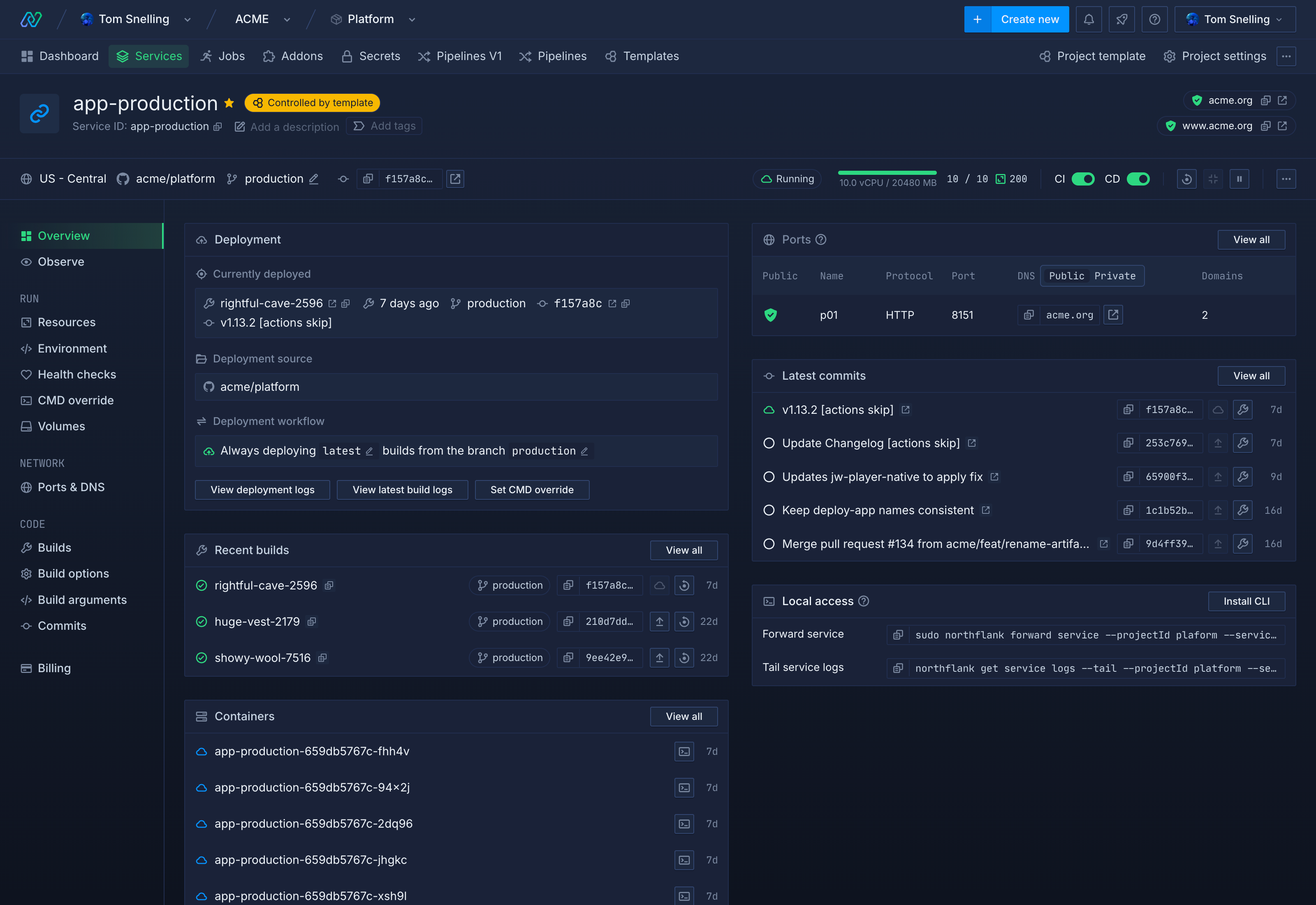
Northflank logs are available for 60 days, and log sinks pipe logs out to other observability systems. Northflank also provides a custom alerting suite that delivers infrastructure alerts through notification integrations and webhooks.
Kubernetes concepts appear in the dashboard as they do elsewhere in the product. You'll see compute plans when creating services, and cluster state when debugging.
### Railway
Railway's default project UI is a real-time collaborative canvas showing all services and how they relate to one another. Changes from teammates appear live, and environment variables can be shared across services within a project instead of being duplicated per service.
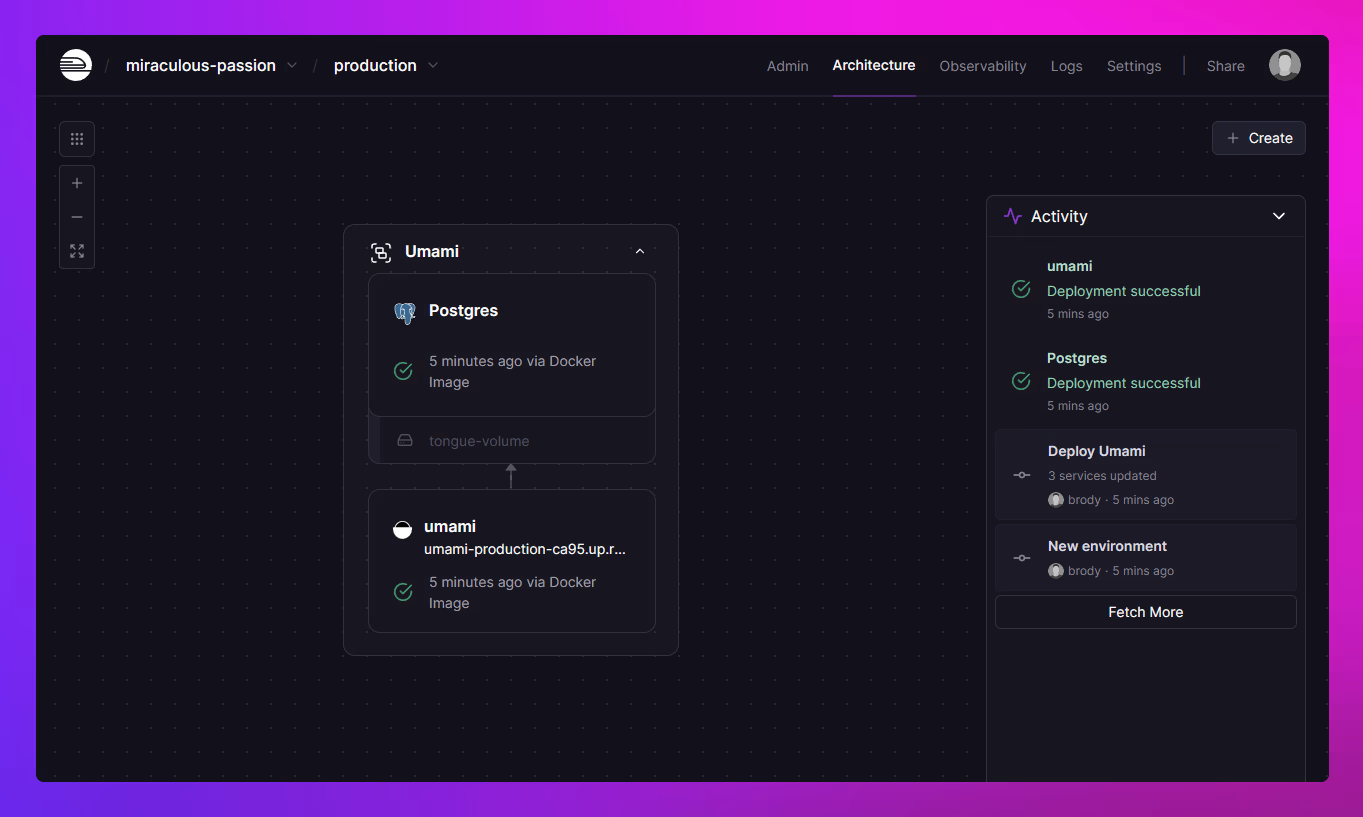
Every service comes with CPU, memory, disk, and network metrics, with up to 30 days of history. Deployments are marked on the metrics graphs to make it easier to connect a resource spike to the code change that caused it. Metrics for services with replicas can be viewed summed or per replica.
The Observability Dashboard provides a configurable view of metrics, logs, and spend for each environment. Log widgets accept the same filter syntax as the Log Explorer, monitors can be attached to any widget for alerting, and webhooks send deployment events to an external URL.
Railway also maintains a template directory where anyone can package and publish a deployable stack. Template creators earn a 25% kickback on the usage their templates generate.
## AI capabilities
### Northflank
Northflank primarily provides AI infrastructure _for_ AI workloads, including microVM-backed sandboxes for running untrusted LLM-generated code and GPUs for intensive machine learning workloads. These features are geared toward people building AI- and machine learning-powered products.
### Railway
Railway also includes sandboxes for running untrusted code at scale, and it uses AI to make the process of shipping software effortless.
The Railway agent is a chat-based assistant that lives inside your project, with all the context and tools it needs to diagnose errors, fix bugs, build new features, and ship them to users.
The same underlying agent powers Railway's Slack and Discord notifications, where you can tag `@railway` and have it get to work without switching contexts. Railway's MCP server also brings Railway context and tools into the agent harnesses you already use.
## When to pick each
### Northflank
Northflank is a great pick if your workloads require GPUs. Inference, model serving, and training are all supported, with fractional GPUs on the low end and H100 and B200 access on the high end.
Northflank is also the right choice when compliance requirements demand BYOC or in-your-VPC deployment. Data residency rules or a mandate to keep workloads inside your own cloud account can rule out a fully managed platform entirely, and Northflank makes bringing your own cloud a self-serve action rather than gating it behind an enterprise sales process.
Some teams simply want managed Kubernetes as their abstraction, and here Northflank shines. If your team is well staffed, already fluent in container orchestration, and looking for a control plane over their clusters instead of a replacement for them, Northflank fits how you already work.
### Railway
Pick Railway if you don't want to think about infrastructure. The platform can be operated by a software engineer with basic infrastructure knowledge and doesn't require specialized platform or DevOps expertise. Deploying from a repo requires zero configuration, there are no Kubernetes concepts or compute plans to learn, and monitoring and alerting work right out of the box. Because everything runs on Railway-owned hardware, there's only one vendor to vet and one bill to pay.
Railway also shines if you don't want to think about scaling. Railway services bill on actual consumption rather than allocated capacity, and scale up and down automatically based on traffic. Idle services sleep to zero with serverless, so multi-service projects with variable load stay affordable without manual sizing of instances or tuning of autoscaling thresholds.
Railway is further along on AI-assisted operation. Railway Agent diagnoses failed deploys and can open a PR with a fix, while the MCP server and agent skills mean something you vibe-coded with Claude Code, Cursor, or Codex can be deployed by the same agent that wrote it, database and all, with no Dockerfile step first. Railway Sandboxes go a step further and ship with Claude Code, Codex, and OpenCode preinstalled, so an agent can build and deploy without ever leaving Railway's infrastructure.
## Summary
| Category | Northflank | Railway |
| --- | --- | --- |
| Infrastructure | Multi-tenant Kubernetes or BYOC into your cloud account | Railway-owned global hardware (Railway Metal) |
| Kubernetes exposure | Intentional: plans map to cluster resources | None; custom orchestrator |
| Billing basis | Per-second, on a selected compute plan | Per-minute, on resources actually consumed within your plan's ceiling |
| Compute plan tiers | Fixed vCPU/GB tiers (for example, nf-compute-100-2) | No preset tiers; scales continuously up to plan limits |
| Serverless sleep | Not offered | Idle services sleep with no compute charges |
| Vertical scaling | Select a larger compute plan | Automatic to plan limits |
| Horizontal scaling | Threshold-based autoscaling; requires tuning | Replicas with automatic traffic distribution |
| Multi-region | Region configuration per service or cluster | Built-in; traffic routed to nearest region |
| GPU support | Yes (fractional up to H100/B200) | No |
| BYOC | Yes, self-serve | No |
| Databases | Managed addons: PostgreSQL, MySQL, MongoDB, Redis, MinIO, RabbitMQ, Memcached | [Managed](/databases#what-railway-manages) PostgreSQL, MySQL, Redis, MongoDB: high availability, backups, point-in-time recovery (PostgreSQL, MySQL) and connection pooling (PostgreSQL) you turn on from the dashboard; more engines via the template directory |
| Background workers | Dedicated worker service type | Any service without a public domain |
| Sandboxes | MicroVM-backed (Kata, Firecracker, gVisor), built for untrusted/multi-tenant code execution | Isolated VMs with exec, fork, checkpoints, and network isolation modes; built for agent and dev workflows |
| Observability | Logs and metrics retained 60 days; native log sinks to Datadog, Better Stack, Honeycomb, S3, and custom HTTP; audit logs | Metrics retained 30 days; configurable Observability Dashboard with log/metric widgets and monitors; forward logs via Vector, Fluent Bit, or OpenTelemetry |
| Templates | Stack templates | Template directory with 25% creator kickbacks |
| Free tier | Free Developer/Sandbox tier (2 services, 1 database, 2 cron jobs); payment method required to create resources | One-time $5 trial credit for 30 days, no card required; then Free plan with $1/month credit |
| UI | Traditional dashboard | Real-time collaborative canvas |
| AI capabilities | GPU hosting, microVM sandboxes for untrusted AI code execution | Railway Agent, MCP servers, agent skills, sandboxes for agent and dev workflows |
## Frequently asked questions
### Is Railway cheaper than Northflank?
It depends on the workload. Railway meters resource consumption per minute, so services that idle for part of the day, or sleep entirely with serverless, cost less than Northflank's fixed per-plan billing. For a service that's saturated 24/7 with nothing to scale down, Northflank's flat rate can come out ahead. See the pricing section above for a worked example.
### Does Railway run on Kubernetes?
No. Railway runs on Railway Metal, its own custom orchestration layer, so there are no Kubernetes concepts anywhere in the product.
### Does Railway support background workers?
Yes. Any service without a public domain works as a background worker, and services can be put on a cron schedule if they only need to run at specific times.
### Does Railway support BYOC?
No. Railway doesn't offer a bring-your-own-cloud option; all services run on Railway-owned infrastructure.
### Does Railway support GPU workloads?
No. Railway doesn't currently offer GPU instances.
### Does Railway support AI workloads like inference or training?
Not directly. Railway doesn't offer GPU compute, so inference and training workloads that need it are better suited to Northflank.
### Does Railway have an AI assistant?
Yes. Railway Agent is built into the dashboard and can create and configure services, set variables, connect databases, and diagnose failed deployments, including opening a pull request with a proposed fix.
### Can I deploy an app built with Claude Code to Railway?
Yes. Railway's MCP server and agent skills let Claude Code, Cursor, Codex, and Copilot deploy and operate Railway directly, so an agent that wrote the app can also deploy it and fix issues without leaving the conversation.
## Migrate from Northflank to Railway
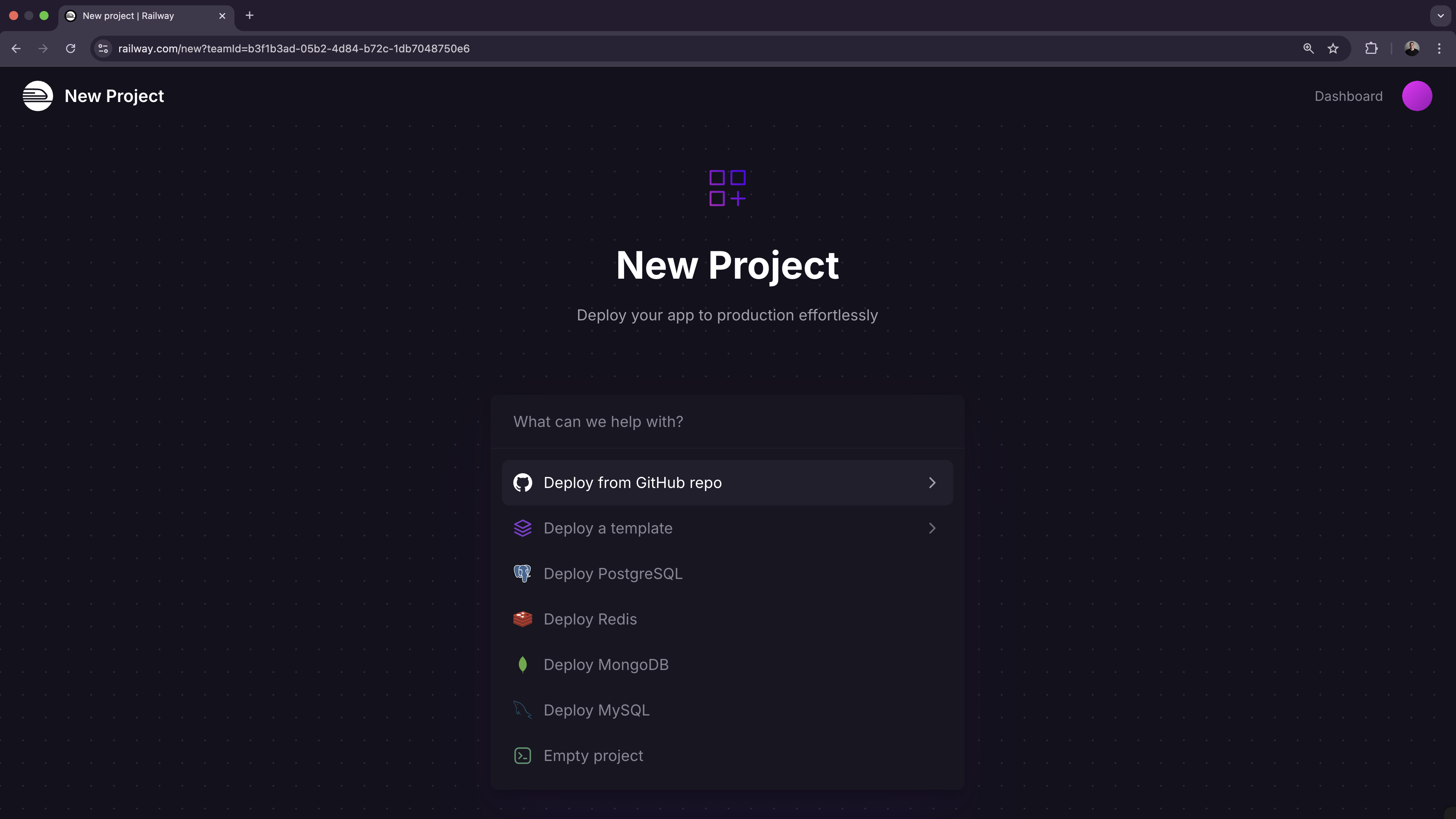
To get started, [create an account on Railway](https://railway.com/new). It's free, comes with $5 in trial credits, and doesn't require a payment method to get started.
1. Choose "Deploy from GitHub repo", connect your GitHub account, and select the repo you want to migrate.
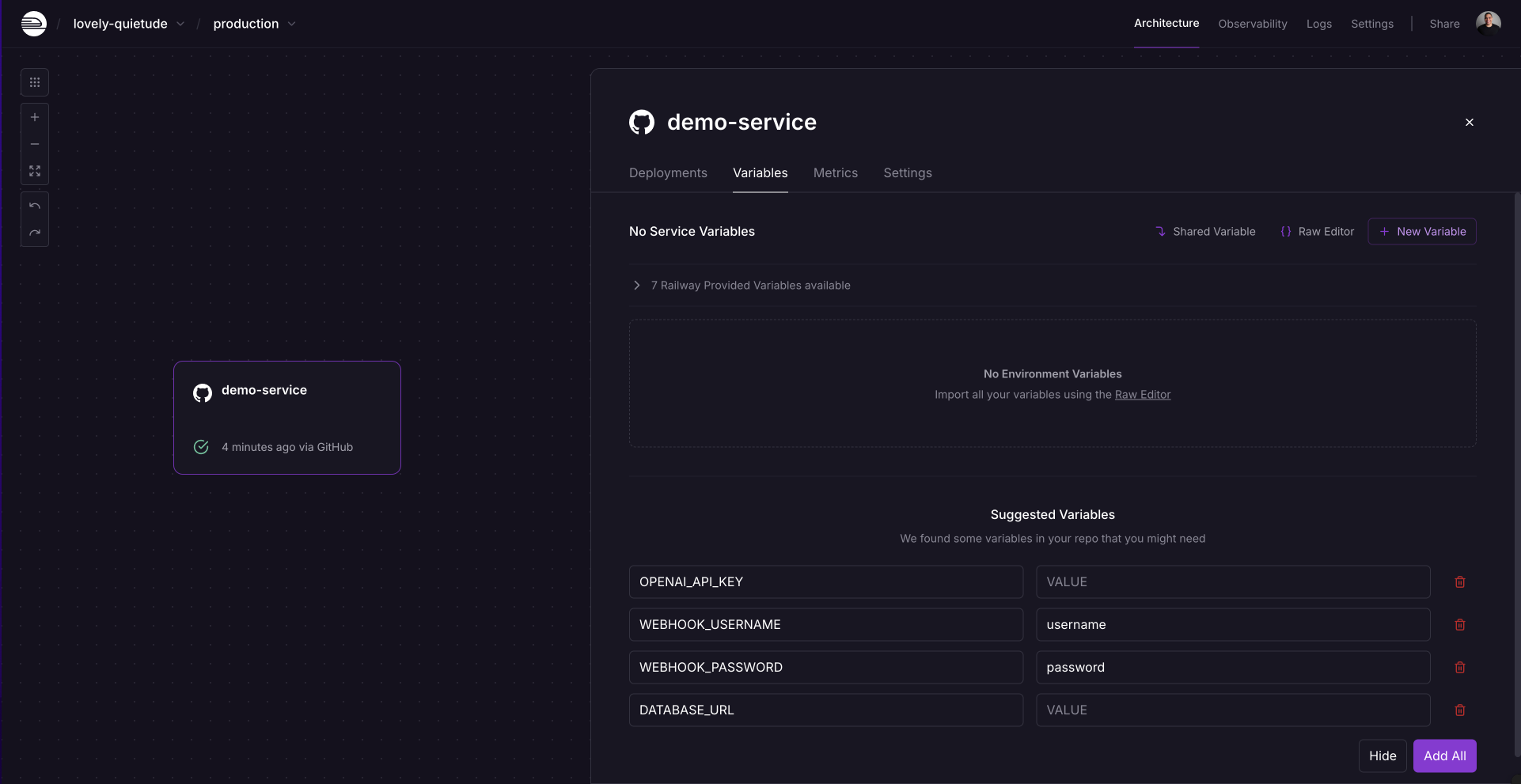
2. If your project uses any environment variables or secrets:
1. Click the deployed service.
2. Navigate to the "Variables" tab.
3. Add a new variable by clicking "New Variable". Alternatively, import a `.env` file by clicking "Raw Editor" and adding all variables at once.
3. To make your project accessible over the internet, configure a domain:
1. From the project's canvas, click the service you want to configure.
2. Navigate to the "Settings" tab.
3. Go to the "Networking" section.
4. You can either:
1. Generate a Railway service domain: this makes your app available under a `.up.railway.app` domain.
2. Add a custom domain: follow the DNS configuration steps.
If you're starting from scratch, check out the [Railway Quickstart](/quick-start).
## Need help or have questions?
If you need help along the way, the [Help Station](https://station.railway.com/) is a great resource to get support from the team and community.
Working with a larger workload or have specific requirements? [Book a call with the Railway team](https://cal.com/team/railway/work-with-railway) to explore how we can best support your project.