Outbound Networking
Outbound Networking refers to traffic flowing from your Railway services to external destinations on the internet.
Email delivery
SMTP is only available on the Pro plan and above.
Free, Trial, and Hobby plans must use transactional email services with HTTPS APIs. SMTP is disabled on these plans to prevent spam and abuse. However, even when SMTP is available, we recommend transactional email services with HTTPS APIs for all plans due to their enhanced features and analytics.
After upgrading to Pro, redeploy the service that needs to use SMTP for the changes to take effect.
Email service examples
Here are examples of transactional email services you can use:
Note: These services are required for Free, Trial, and Hobby plans since outbound SMTP is disabled.
These services provide detailed analytics and robust APIs designed for modern applications. They also work on all Railway plans since they use HTTPS instead of SMTP.
Debugging SMTP issues
If you are experiencing issues with SMTP on the Pro plan, please the follow the steps below to help us diagnose the problem:
-
First, ensure that you have tried re-deploying your service
-
SSH into your service using the Railway CLI:
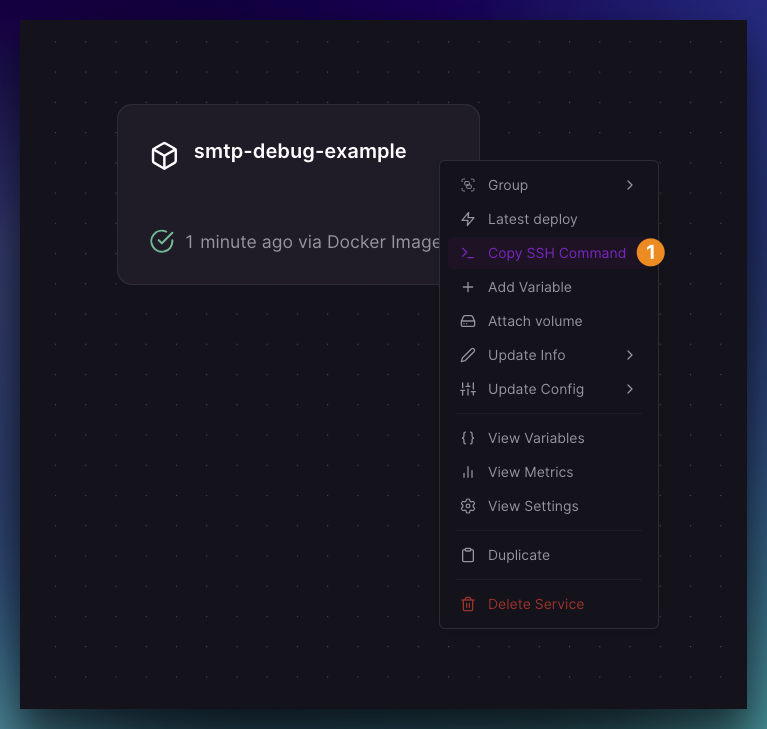
- Copy-paste this command and change the
SMTP_HOSTto the host you're trying to connect to:
SMTP_HOST="$REPLACE_THIS_WITH_YOUR_SMTP_HOST" bash -c '
for port in 25 465 587 2525; do
  timeout 1 bash -c "</dev/tcp/$SMTP_HOST/$port" 2>/dev/null && \
    echo "$SMTP_HOST port $port reachable" || \
    echo "$SMTP_HOST port $port unreachable"
done
'- Execute the command. You should see output similar to this:
smtp.yourhost.com port 25 reachable
smtp.yourhost.com port 465 reachable
smtp.yourhost.com port 587 reachable
smtp.yourhost.com port 2525 reachable
Example:
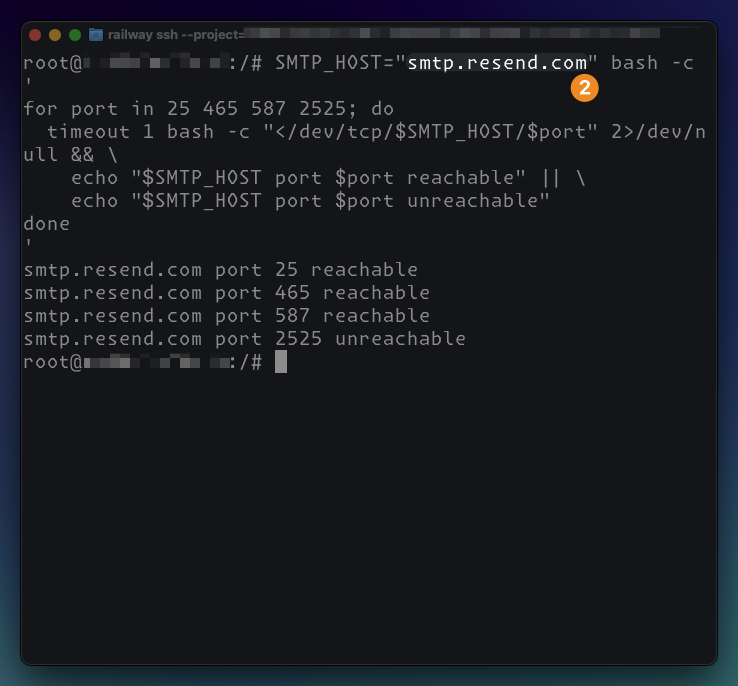
Replace smtp.resend.com above with your SMTP host.
-
If any of the ports are unreachable, please contact your email provider to ensure that they are not blocking connections from Railway's IPs. Port 2525 is a non-standard SMTP port that may be blocked on popular email providers, so 2525 being unreachable is not an issue
-
Otherwise, please reach out to us at Central Station and share the output of the command for further assistance
Static outbound IPs
Railway offers Static Outbound IPs for Pro plan customers who need consistent IP addresses for firewall allowlisting or third-party integrations.
You can manage Static Outbound IPs from the dashboard or with the
railway outbound-network static-ip CLI
commands. After enabling or disabling Static Outbound IPs, redeploy the service
before outbound traffic uses the updated IP assignment.
Outbound IPv6
Railway supports outbound IPv6 connections on an opt-in basis per service. Enable this when you need to reach IPv6-only destinations or services that perform better over IPv6.
To enable it, open your service's Settings tab, scroll to the Networking section, and toggle Enable Outbound IPv6. This creates a staged change. Apply the staged change to redeploy the service.
You can also stage Outbound IPv6 changes with
railway outbound-network ipv6.
Outbound IPv6 is disabled by default. Enabling it does not affect your
service's existing IPv4 outbound connectivity. Both work concurrently when the
toggle is on. While this setting is disabled, IPv6 connection attempts fail with
"Network is unreachable" or ENETUNREACH.
Related features
- Static Outbound IPs - Assign permanent outbound IP addresses
- railway outbound-network - Manage outbound networking from the CLI
- Private Networking - Internal service communication
- Public Networking - Inbound traffic to your services