Redis High Availability
Railway can convert an existing Redis service into a managed high-availability cluster backed by Redis Sentinel and HAProxy. Every Redis node runs a colocated Sentinel process — Sentinel handles primary election and failover, and HAProxy routes client connections to whichever node is currently the primary. If the primary goes down, Sentinel promotes a replica and HAProxy begins routing to it within seconds.
Converting to high availability is what makes this a managed database in the sense what Railway manages describes: Railway provisions the cluster and ships security patches for its image, and failover happens automatically inside the cluster. The cluster overview shows each node's role and health; alerting on it is yours to set up, and Railway does not publish an uptime SLA today. Schema, queries and data stay yours.
How the cluster is shaped
A converted cluster consists of:
- Redis data nodes — your original service becomes the primary, plus an even number of replicas. Every node also runs a Sentinel, so the cluster always totals an odd number of Sentinel voters (3, 5, 7, or 9) — an odd count is what lets Sentinel reach a majority during a network partition instead of splitting the vote.
- HAProxy — the single entry point for clients. It health-checks every Redis node and routes connections to the current primary, so your application never needs to know which node holds that role.
Persistence is managed for you: the cluster always runs with AOF (append-only file) persistence enabled, so an auto-restarted node comes back with its data instead of an empty dataset.
Prerequisites
Before converting, confirm the following:
Supported Redis image — Services running any of the following images can be converted:
- The official redis Docker image (what Railway's Redis template deploys)
- The
ghcr.io/railwayapp-templates/redis-ha/redis-sentinelimage, when already deployed but running standalone - The legacy Bitnami Redis template lineage — the
railwayapp/redisDocker Hub mirror and thebitnami/redisimage it mirrors
Forks and bundles (e.g. Valkey, Redis Stack) are not compatible. If your service qualifies, the High Availability section appears in its Config tab.
Supported version — The image must be tagged with a supported major version: 7 or 8. The :latest tag and named tags are not supported — Railway needs a detectable version to pin the cluster's images to. If your service uses :latest, change the image to a versioned tag (e.g. redis:8) in the service settings and redeploy before converting.
As part of the conversion, Railway pins the data nodes to your service's exact major.minor version. Redis replicas sync from the primary via RDB snapshots, which are not readable across mismatched versions — pinning guarantees every node in the cluster speaks the same format.
No custom start command — The cluster image manages its own startup, so a service with a customer-set start command can't be converted. If your service has one, the High Availability section shows a warning with a one-click Reset to template default button — resetting redeploys the service with its template's original command (which keeps authentication intact) and unblocks the conversion.
Step 1 — Open the High Availability section
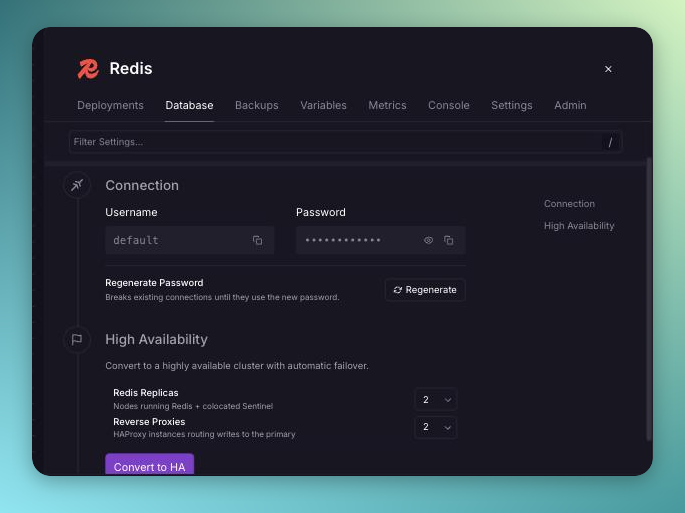
Open your Redis service and navigate to Database → Config → High Availability.
Step 2 — Configure and Convert
You will see options to configure the cluster size before converting:
| Setting | Default | Description |
|---|---|---|
| Redis Replicas | 2 | Replicas added to the primary. Options: 2, 4, 6, or 8 — even counts keep the cluster's total node count (and with it the Sentinel voter count) odd: 3, 5, 7, or 9 nodes. |
| Reverse Proxies | 2 | HAProxy instances routing connections to the primary. Options: 1 or 2. Trial workspaces are limited to 1. |
There is no separate coordinator tier to size — Sentinel runs on the Redis nodes themselves.
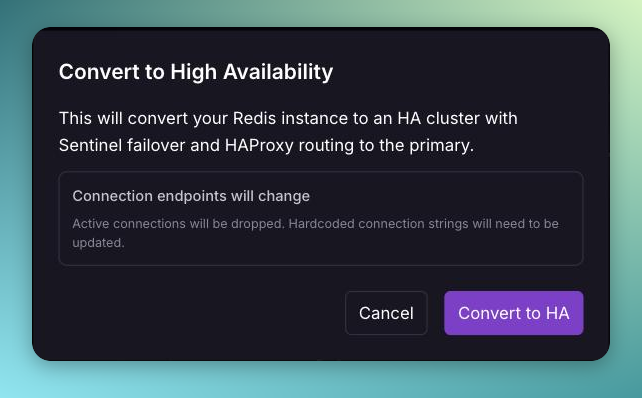
Click Convert to HA. A confirmation dialog will appear warning that:
- Active connections will be dropped during the conversion
- Connection endpoints will change — any hardcoded connection strings will need to be updated after conversion
After confirming, Railway will:
- Create a backup of your database volume (expires in 21 days)
- Provision all cluster services (replicas and HAProxy) as staged changes
- Redirect you to the cluster overview
Review the staged changes and click Deploy to complete the conversion.
Step 3 — Connection Strings
Once the cluster is deployed, connect through HAProxy — never to an individual Redis node. HAProxy always routes to the current primary, so connections keep working across failovers:
| Variable | Points to | Use for |
|---|---|---|
REDIS_URL | Redis HA (HAProxy) — private network | Connections from inside Railway |
REDIS_PUBLIC_URL | Redis HA (HAProxy) — TCP proxy | Connections from outside Railway |
Railway automatically migrates all variable references within your project as part of the staged changes. Any service that references your Redis service's variables (e.g. REDIS_URL) will be updated to reference the new Redis HA (HAProxy) service instead — no manual changes needed for services within Railway.
The only case that requires manual action is if you have hardcoded connection strings anywhere — in application code, Railway variables set to a literal URL (rather than a reference), other Railway projects, external tools, or CI pipelines. After deploying the cluster, update those to use the connection details from the Redis HA service.
REDIS_PUBLIC_URL exists only while public access is enabled. If your standalone Redis was publicly exposed, the conversion carries the public endpoint over to Redis HA automatically; otherwise the cluster is private by default — click Connect on the cluster view and add Public Access to create the TCP Proxy and the variable.
Step 4 — Verify Cluster Health
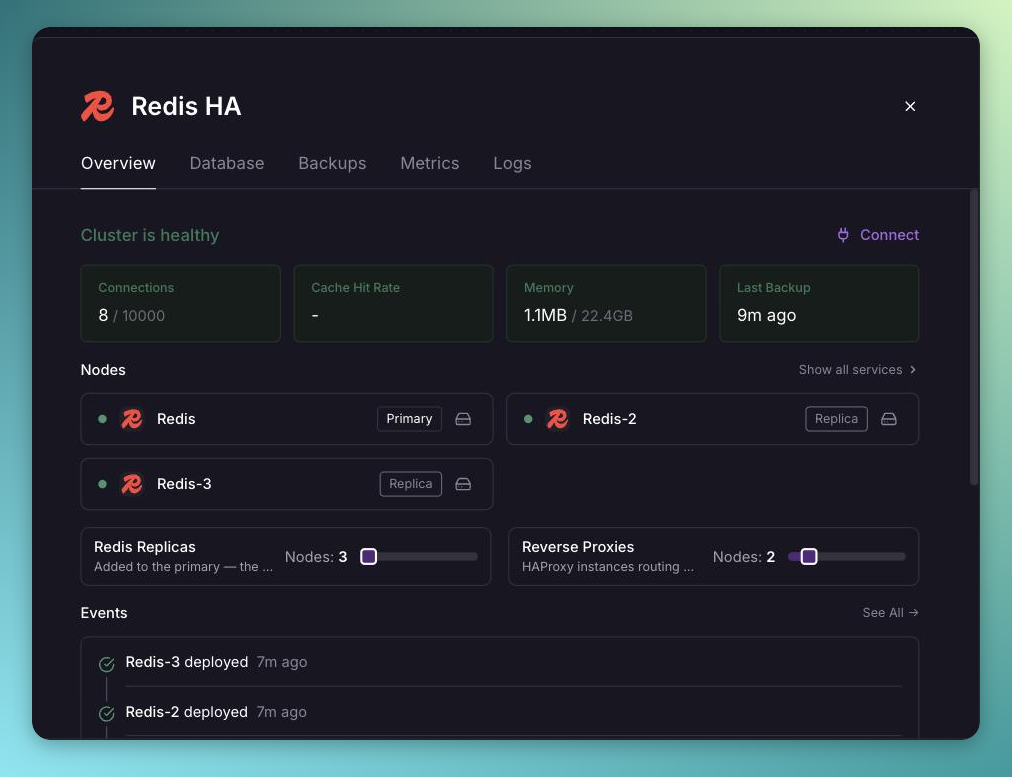
After all deployments reach a running state, allow a minute or two for Sentinel to establish the primary and for the replicas to complete their initial sync. The cluster overview in the Railway dashboard shows each node's role — the current primary carries a Primary badge — along with per-node health.
Failover
Failover is automatic. When the primary becomes unreachable, the Sentinels vote — once a majority agrees it is down, one replica is promoted and HAProxy reroutes connections to it. In-flight connections to the old primary are dropped; clients that reconnect (which most Redis clients do by default) resume against the new primary without any configuration change, because they connect through HAProxy.
To move the primary role deliberately (for example, back onto the original node after a failover), open the cluster overview and use Make Leader on the node that should take over. This performs a coordinated switchover with the same brief connection drop as a failover.
Scaling the Cluster
You can change the number of replicas after conversion from the cluster overview. Replica counts move in steps of two (2, 4, 6, or 8) for the same quorum reason as at conversion time: the cluster total stays odd.
Reverting to Standalone
You can revert a cluster back to a single standalone Redis service from the cluster overview, or from Database → Config → High Availability. Click Revert to Standalone to stage the changes.
Reverting will:
- Delete all HA services (replicas and HAProxy)
- Restore the TCP Proxy directly on the original Redis service, if the cluster was publicly exposed
- Migrate variable references back to the root service
The reverted service stays on the cluster's redis-sentinel image rather than returning to redis:X. Running standalone, it behaves like a plain Redis with authentication intact — leave the image as is. Swapping it back to redis:X by hand drops the --requirepass startup wiring the sentinel image provides, so clients that send your password start failing to authenticate.
Reverting keeps every deleted node's volume. Deleting the cluster services does not delete their volumes: the replicas' volumes stay in your project, unattached, and continue to count toward storage billing. This is deliberate — a revert never destroys data. Once you've confirmed the standalone Redis service is healthy, it is safe to delete the leftover volumes from the project canvas. If you convert to HA again later, the new cluster provisions fresh volumes (with suffixed names, since the kept ones still hold the original names) — it does not reuse them.
Reverting is only available while the original Redis service is the cluster primary. Reverting keeps that service and deletes every other node — if the primary role has moved after a failover, reverting would delete the node holding the latest data. If the original service is not the primary, use Make Leader to promote it first; the revert flow offers this when it applies.
Railway will automatically migrate all variable references within your project back to the original Redis service as part of the staged revert. As with conversion, any hardcoded connection strings outside of Railway will need to be updated manually.
Support scope
Changing the template as shipped, such as its image, start command or variables, or changing the cluster's members outside Railway's high availability flows, makes the database yours to manage; see database support scope.