Running Agents on Railway
The way companies use LLMs has rapidly shifted from chat-based interfaces like ChatGPT to agents that can autonomously complete open-ended tasks. Agents iteratively call LLMs and use tools to write code, prepare reports, send emails, and take action in other connected systems.
In addition to human developers using agents like Claude Code synchronously on their laptops, AI-enabled practitioners are increasingly cutting the human out of the loop entirely, handing more work over to always-on, autonomous agents in the cloud. These agents have a few special infrastructure requirements when moving to the cloud, and Railway is the simplest way to deploy, serve, and monitor them at scale.
- Persistent, always-on process. Agents need to be continuously on and listening for work. Production agents doing real work can take several minutes to iterate and respond, so traditional serverless functions with aggressive timeouts are not a good fit. Railway runs long-lived services that stay up between requests. Historically, Railway's service infrastructure sits at 99.96% uptime.
- Secure inbound access. Something has to tell your agent that work is ready. Railway can generate a public URL for every service at deploy time. You can swap in a custom domain or keep the generated one. Either way, webhooks from GitHub, Slack, and similar services have a stable address to target.
- Outbound access. Your agent needs to reach APIs, push to GitHub, send notifications, or call whatever it integrates with. Railway services have unrestricted outbound internet access by default. For agents that talk to each other within a project, Railway's private networking handles that over WireGuard-encrypted connections with no configuration needed.
- Secret storage. The API keys, tokens, and credentials your agent needs stay in Railway's Variables store, encrypted at rest and only injected at runtime.
- Logs and observability. When an agent does something unexpected, you need to trace what happened. Railway streams real-time logs per service and keeps a full deployment history so you can see exactly what ran and when.
As your agent fleet's responsibilities expand, Railway provides services to complement the core compute, networking, and config offerings above, including volumes, storage buckets, databases, custom networking options, replication, and more.
Guide: Running a Claude-powered GitHub DevBot on Railway
The example that follows uses an open source repo that spins up an embedded, autonomous agent that monitors a repository for new GitHub issues and opens PRs to address them. The system works as follows:
- A new issue is opened in your GitHub repository of choice.
- GitHub fires a webhook to your Railway agent service's public URL.
- The agent clones the repo, creates a branch, and constructs a prompt from the issue title and body.
- Claude runs headlessly against that branch, reading files, making changes, and running checks.
- The service commits Claude's changes, pushes the branch, and opens a PR.
- The service posts a comment on the original issue linking to the PR.
Railway setup
This guide assumes you have a Railway account and project. If you don't yet, check out the quick start.
Connect your GitHub account
Ensure your project is connected to your GitHub account by following the connection steps in the quick start. To follow along with the example repository, fork it to your GitHub account.
Authenticate the Railway CLI (optional)
To use the CLI to interact with Railway, see the CLI docs.
Guide setup
Step 1: Deploy the agent code
The agent code consists of a single API endpoint that, when called by GitHub's outbound webhook with an issue-created event, takes that issue and runs Claude against it with the following prompt:
You are handling GitHub issue #{issue_number} in {full_name}.

You are running in an empty working directory. The `gh` CLI is authenticated via $GH_TOKEN.

Do the following, end to end:
1. Run `gh auth setup-git` so git can authenticate via gh.
2. Run `gh issue view {issue_number} --repo {full_name}` to read the issue.
3. Clone the repo: `gh repo clone {full_name} repo`, then work inside `repo/`.
4. Configure git inside the repo:
   `git config user.email "claude-runner@railway.app"`
   `git config user.name "Claude"`
5. Create and check out a branch named `claude/issue-{issue_number}`.
6. Implement what the issue describes. Follow CLAUDE.md conventions if present.
7. Commit with a clear conventional commit message derived from the actual diff.
8. Push the branch: `git push origin claude/issue-{issue_number}`.
9. Open a PR with `gh pr create` against the repo's default branch. Write a real title and body that summarize the change. Include `Closes #{issue_number}` in the body.
10. Comment on the issue: `gh issue comment {issue_number} --repo {full_name} --body "I've opened a PR for this: <pr-url>"`.

Notes:
- You are operating autonomously. There is no human available to answer questions.
- Make a decision for every ambiguity. Never leave a task partially complete.
- Do not stop until the PR is open and the issue has been commented on.
The repository also contains a Dockerfile that installs the dependencies the service needs, including the GitHub CLI and Python runtime. To get started:
- Fork the example repository and connect it to Railway by following the README in
agent-runner/. - When your service is up and running, note the public URL from the service details pane.
Step 2: Set environment variables
Your Railway DevBot service needs a few environment variables to securely connect to Anthropic and GitHub. Add three variables under your service's Variables tab:
ANTHROPIC_API_KEY: from console.anthropic.com.GITHUB_TOKEN: a classic PAT withreposcope, or a fine-grained token scoped to the target repo.GITHUB_WEBHOOK_SECRET: any strong random string.
Step 3: Configure the GitHub webhook
Pick a repo you want the DevBot agent to work on. To test it out with a simple toy app, consider deploying the Trains app, also in the example repository under pr-environments/. Then, in your repo, navigate to Settings → Webhooks → Add webhook and configure the following:
- Payload URL: your Railway service's public URL from Step 1, with
/webhookappended. - Content type:
application/json. - Secret: the same value as
GITHUB_WEBHOOK_SECRET. - Events: Issues only.
Step 4: Watch it work
With your DevBot deployed and listening, and your GitHub webhook ready to send events on issue creation, you're ready to test the agent.
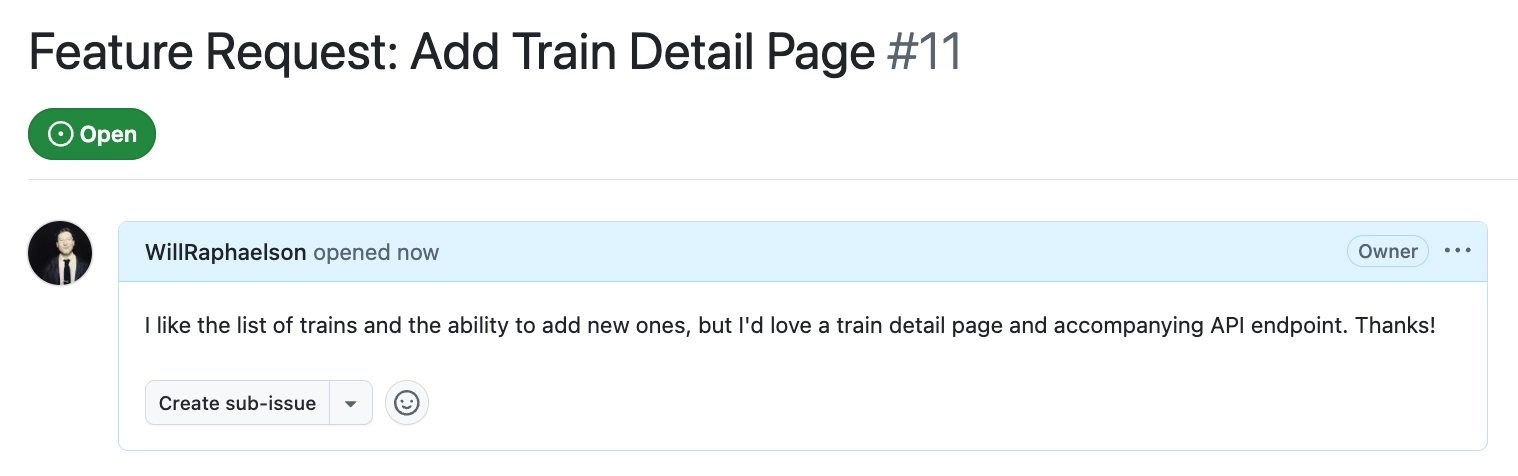
Open an issue in your target repository. For the Trains app, you can open an issue to add a detail page for individual train records.
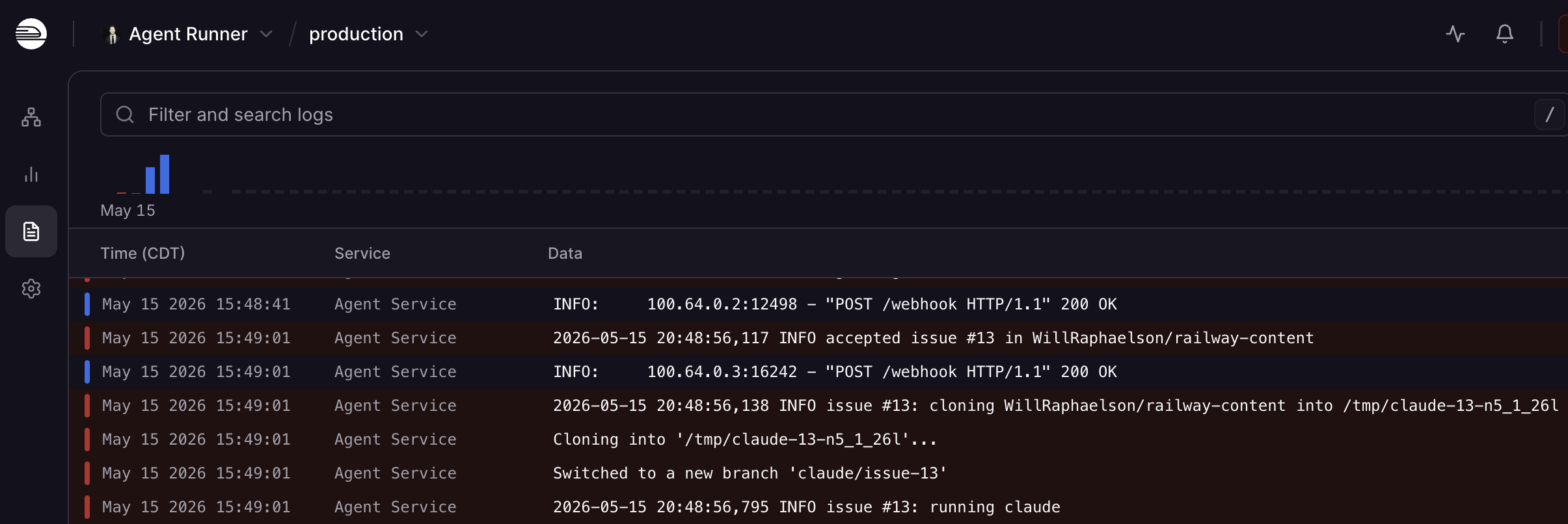
In your Railway service logs, you'll see that the DevBot has received the event and started work.
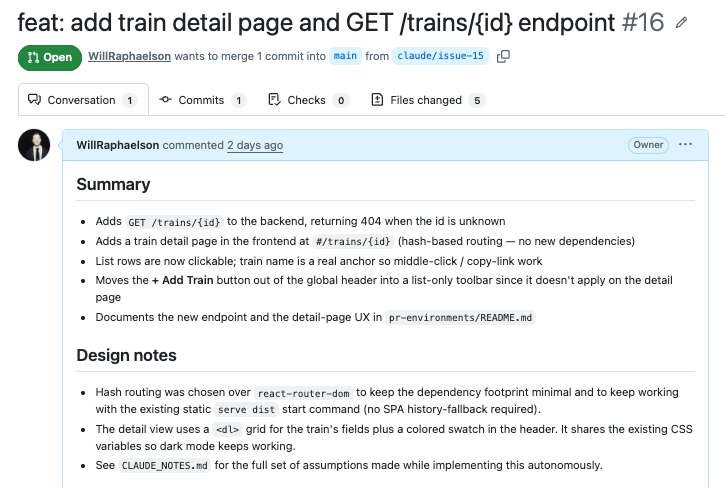
Once Claude finishes, it opens a PR and comments on the original issue with a link to the PR it opened.
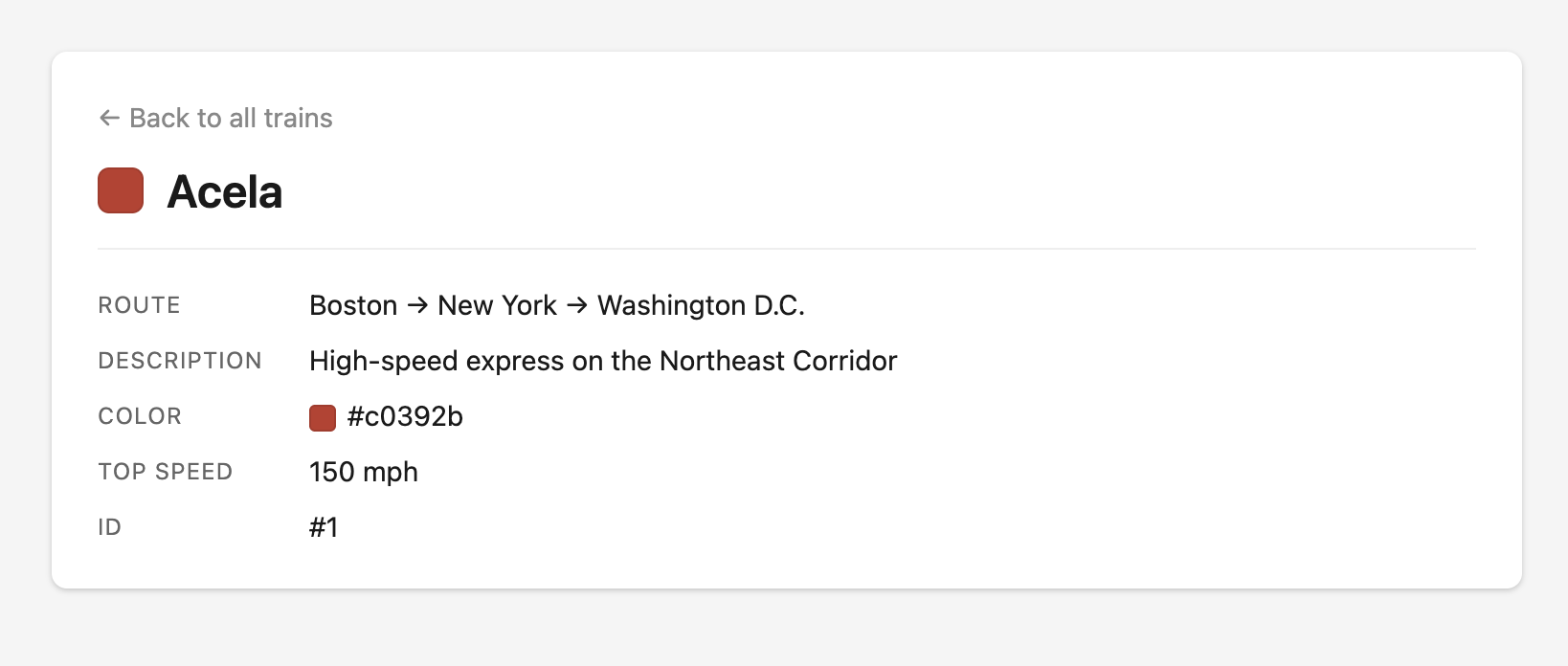
If you look at the deploy preview, the app now has a dedicated /trains/{train_id} endpoint and an associated detail page.
Customizing and expanding
This example proves the concept of a useful but basic agent running on Railway. The same pattern works for any number of agentic workflows, not only Claude-powered DevBots. You can take this project in several directions to make it more powerful or scalable for your context.
Tune the Claude agent
The primary lever for changing how Claude behaves in your repo is CLAUDE.md. Because it lives in your repo and is version-controlled, improving the agent's output is a normal PR workflow. If Claude consistently gets something wrong, update the file, merge, and the next run picks it up automatically. Something like the following can ensure Claude adheres to your team's conventions:
## Style

Write clean, readable code.
Follow the error handling patterns in src/errors.py. Never raise generic
exceptions; use the project's custom error classes. Always add type hints
to new functions. Don't add them to existing ones you're not already editing.
Beyond CLAUDE.md, the --allowedTools flag controls exactly what Claude can do during a run. The example repo defaults to Bash, Read, Edit, and Write. To reduce the blast radius, removing Bash means Claude can no longer run arbitrary shell commands. Adding WebFetch lets it pull in external documentation. Think of --allowedTools as the permission boundary, and CLAUDE.md as the behavioral layer within it.
Security
A PAT works fine for getting started, but it authenticates as the person who generated it. A GitHub App has its own identity, generates short-lived tokens automatically, and can be scoped to specific repositories and permissions. For anything running in production, that's the appropriate setup for machine-to-machine communication.
In practice, you probably don't want every new issue in a busy repository to kick off an agent run. LLM tokens aren't free, and not every issue is worth acting on automatically. A simple approach is to require a maintainer to comment /fix on an issue before the pipeline starts. You can also gate on a label like autofix to manage it from the issue sidebar.
Scalability
By default, anything the agent writes to disk disappears when the service redeploys. For state that needs to stick around, Railway gives you a few options for durable storage depending on the access pattern.
Volumes are attached disk storage that mount directly to your service and survive redeploys. They're a good fit for a local repository cache, a SQLite database, or anything the agent reads and writes frequently. Storage buckets are S3-compatible object storage, accessible from any service in your project, and better suited for larger files or artifacts that need to live independently of the compute service's lifecycle.
For structured data, you can provision a Postgres or Redis instance directly inside your Railway project. Both connect over Railway's private network with no additional configuration. Redis is particularly useful for queueing incoming webhooks so the agent can work through a backlog without dropping requests during periods of heavy traffic.
If your repository gets a lot of issues and the agent is frequently busy, you can add replicas from the service settings. Each replica handles requests independently, so multiple issues can be processed in parallel, with Railway's load balancer distributing traffic between them. You can also increase the CPU and memory allocated to the service if individual runs are slow.
Other agents you can run on Railway
The same pattern you've just deployed works for a wide range of agentic workflows beyond the DevBot:
- A PR reviewer agent that fires on the
pull_requestwebhook event, reads the diff, checks it against yourCLAUDE.mdconventions, and posts a structured review comment before a human looks at it. - A support triage agent that reads incoming tickets from your support platform, classifies them by category and urgency, and routes them to the right queue or team.
- A scheduled research digest that runs on a Railway cron schedule with no webhook required, pulls from a defined set of sources, and posts a summary to Slack or email.
- A Slack-triggered assistant that responds to a slash command in any channel, so your team can kick off agent runs without leaving Slack.
- A data pipeline agent triggered by a file upload to a Railway storage bucket, processing the file and writing output downstream.
Every agent in that list swaps the same three things: where it listens for input, how it constructs the task prompt, and where it sends results when it's done. The Railway infrastructure and LLM process in the middle stay identical.
Conclusion
You now have a project that automatically opens PRs in response to new issues, and a general framework for deploying agents on Railway. If you have any questions or feedback, reach out on Slack or the Central Station.