---
title: Image Auto Updates
description: Learn how to automatically keep your Docker images up to date with scheduled maintenance windows.
---
When you deploy a service using a Docker image, Railway can automatically check for new versions and update your service during configurable maintenance windows. With this, you can keep your services up to date without manual intervention.
## Supported registries
Image auto updates are only available for images hosted on the following registries:
- **Docker Hub** (`docker.io` or no domain prefix)
- **GitHub Container Registry** (`ghcr.io`)
Images from other registries (ECR, GCR, ACR, private registries, etc.) do not support auto updates.
## How it works
Railway periodically checks the Docker registry for new versions of your configured image. When an update is available and your maintenance window is active, Railway will:
1. Create a backup of any attached volumes
2. Redeploy your service with the updated image
3. Notify workspace admins of the update
### Update behavior by tag type
How Railway handles updates depends on the type of tag you've configured:
#### Semantic version tags
For tags like `:v1.2.3` or `:1.0.0`, Railway checks for newer versions and updates your service configuration to the new tag (e.g., `:v1.2.3` -> `:v1.2.4`).
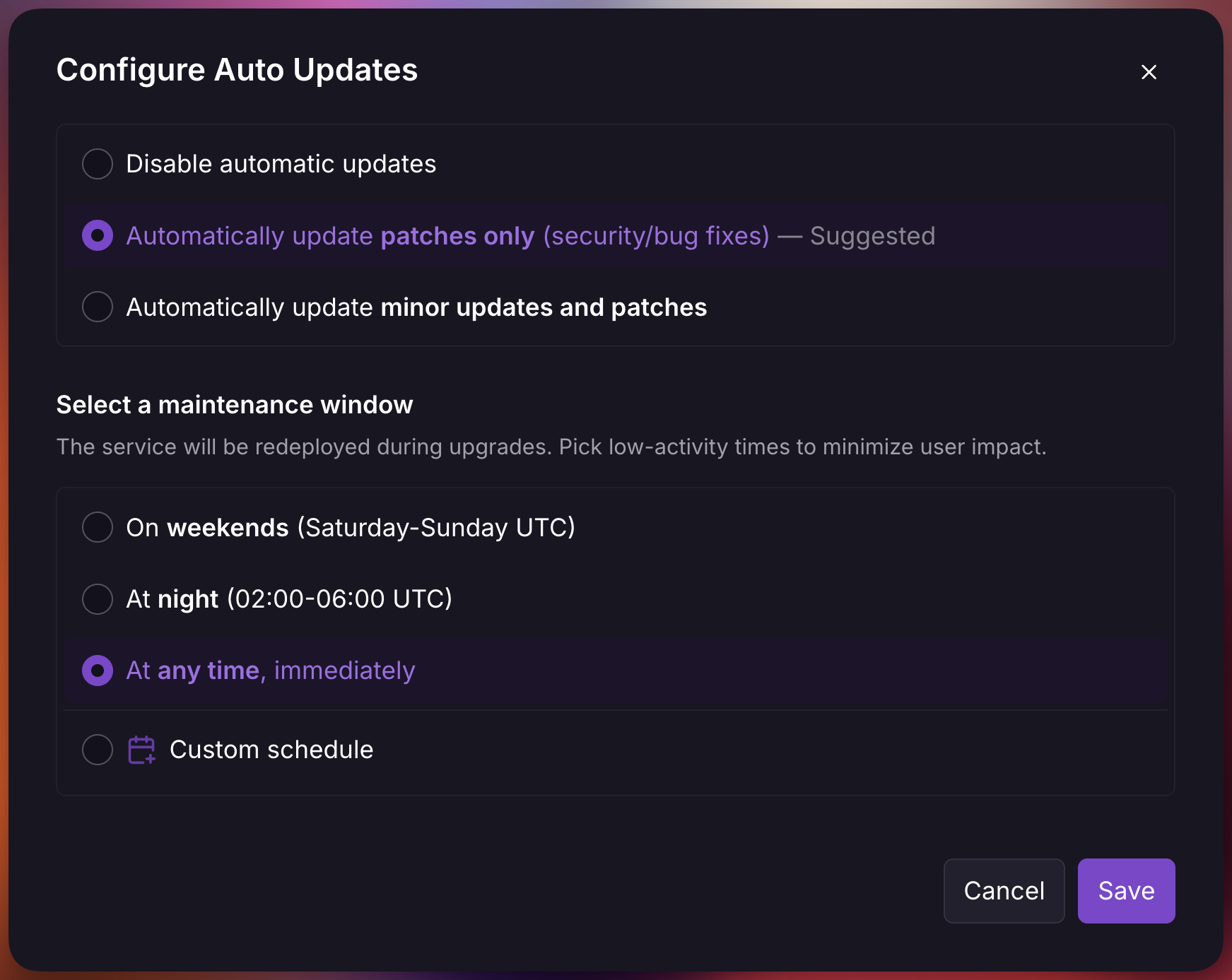
You can choose your update preference in the auto updates settings either **patches only** or **minor updates and patches**:
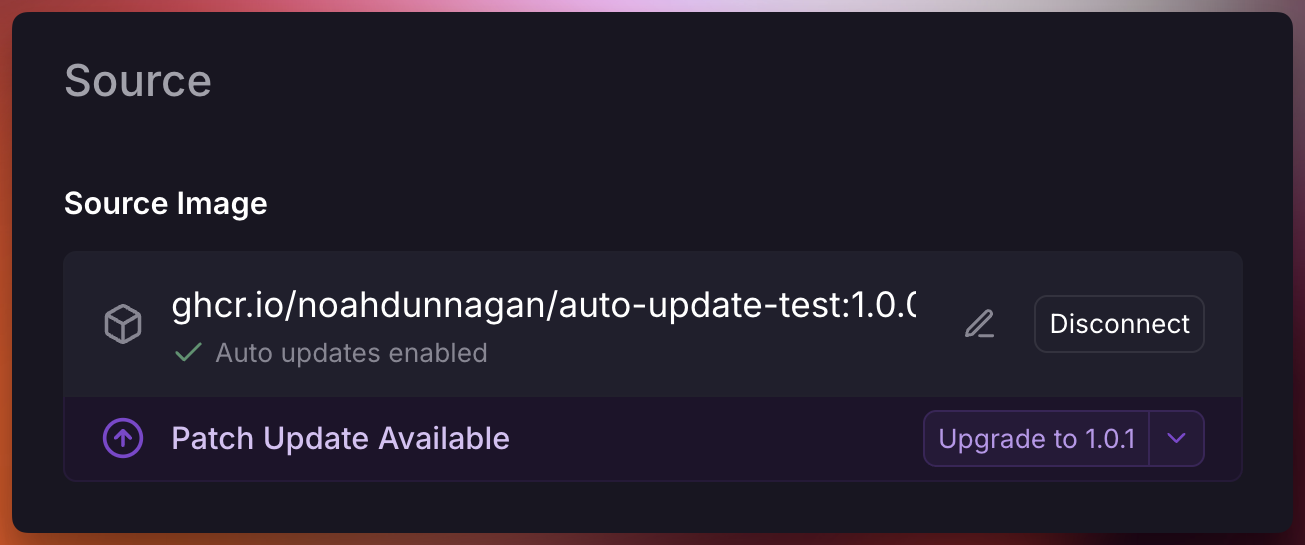
When a new version matching your preference is detected, you'll see a notification:
#### Non-semantic version tags
For tags like `:latest`, `:canary`, or `:staging`, Railway monitors for new image pushes to that specific tag. When a new image is pushed (same tag, different SHA), Railway redeploys your service.
Your configured tag is always preserved. Railway does **not** switch non-semver tags to `:latest`. If you configure `:canary`, Railway only redeploys when a new image is pushed to `:canary`.
## Configure auto updates
To enable automatic image updates:
1. Navigate to your service's **Settings** page
2. Under the **Source** section, select **Configure Auto Updates**
3. Choose your preferred update type
4. Choose a maintenance window
## Maintenance Windows
Maintenance windows define when Railway is allowed to apply automatic updates. All schedules are evaluated in **UTC**.
| Window | Schedule |
| ------ | -------- |
| **Weekends** | Saturday and Sunday, all day |
| **Night** | 02:00 - 06:00 UTC daily |
| **Anytime** | Updates are applied immediately after detection |
| **Custom** | User-defined day and hour ranges |
Note that updates are applied after Railway detects new versions, not the moment they're published. To avoid overwhelming registries, detection results are cached for up to a few hours.
### Custom schedules
Custom maintenance windows let you define days and hour ranges for updates. You can configure multiple windows to match your operational requirements.
## Safety features
Railway includes several safety mechanisms to protect your services during automatic updates:
### Volume backups
For Pro plan users, Railway automatically creates a backup of all volumes attached to the service before applying any update. These backups are named `Auto Update {image}` and can be used to restore data if needed.
### Skip versions
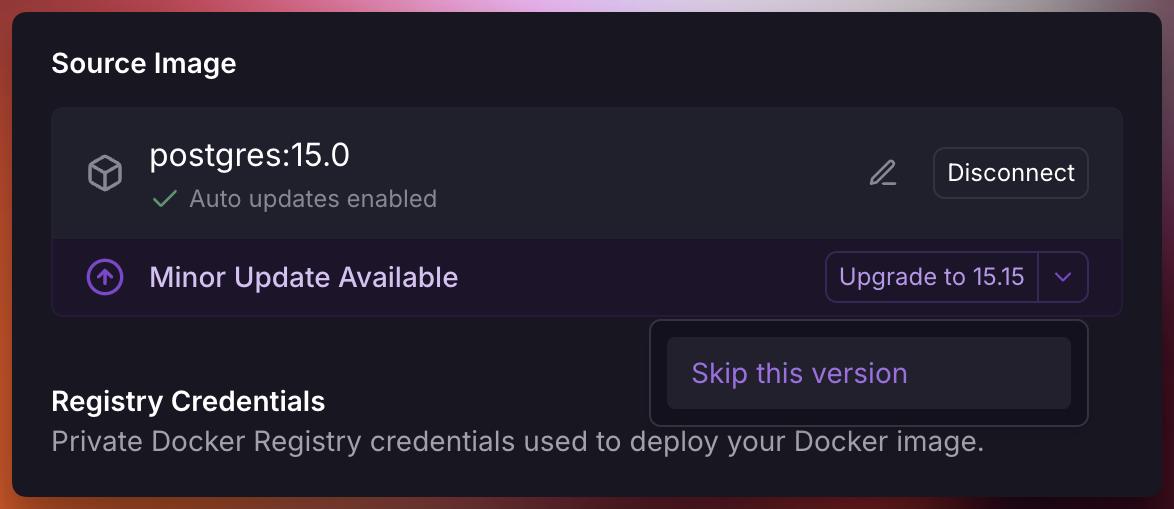
If a specific version causes issues, you can skip it to prevent Railway from automatically updating to that version. Skipped versions will be excluded from future auto-update checks.
When prompted select the dropdown and click "Skip this version"
## Notifications
When an automatic update is applied, workspace admins receive a notification containing:
- Service and environment name
- Previous version
- New version
- Update type
To disable these notifications, create a custom rule setting "ServiceInstance Auto Updated" to "None" for a project.